
What is A2P Standard Brand Registration?
A2P messaging refers to any message sent from an application to a person — for example, automated marketing texts or appointment reminders. To send A2P messages in the U.S., you must register your brand and campaign(s) with The Campaign Registry (TCR) through your messaging provider (e.g., Twilio).
A Standard Brand is designed for businesses registered with an EIN. It allows greater messaging throughput and access to a wider variety of campaign use cases than Sole Proprietor brands.
Key Benefits of Registering as a Standard Brand
Higher message throughput compared to Sole Proprietor Brands.
Required for LLCs, corporations, and most U.S. businesses.
Improved trust score potential through EIN verification.
Enables access to broader campaign use cases.
Lower chance of carrier filtering or message rejection
What Are the Requirements for Standard Brand Registration?
Before registering, ensure you have the following:
Business Legal Name (must exactly match IRS records)
Valid EIN (Employer Identification Number) – U.S. only
Business Type: LLC, Corporation, etc.
Business Industry
Official Business Website
Business Address
Business Contact Information
Authorized Representative’s Name, Title, Email, and Phone Number
How to Register as a Standard Brand
Follow these steps carefully to complete your Sole Proprietor Brand registration:
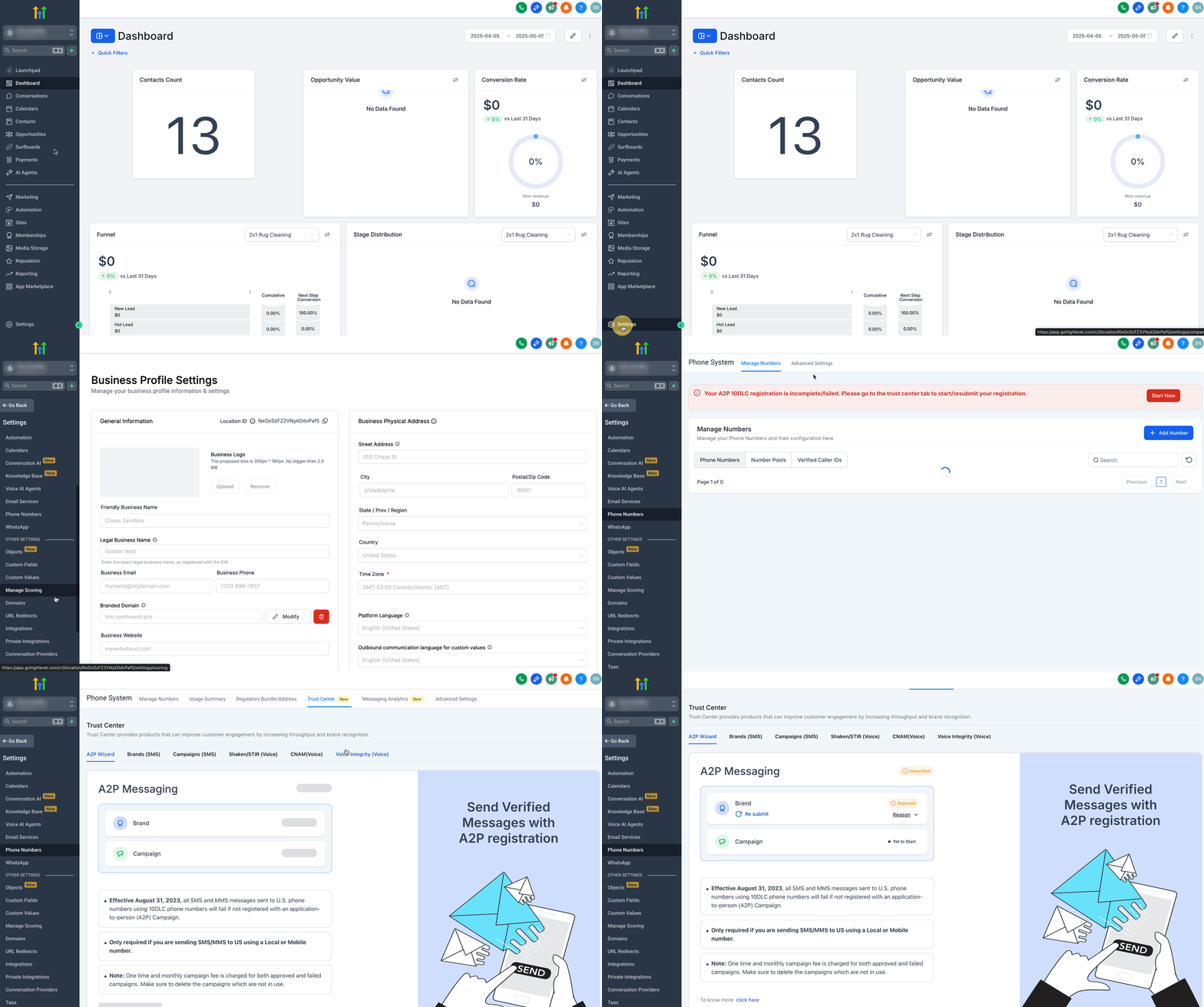
Step 1: Navigate to Trust Center
Click on Settings from your sub-account.
Select Phone Numbers under Business Services.
Click on the Trust Center tab.
Step 2: Determine Profile Needs
Click on the Start Registering Now button under A2P Wizard tab.
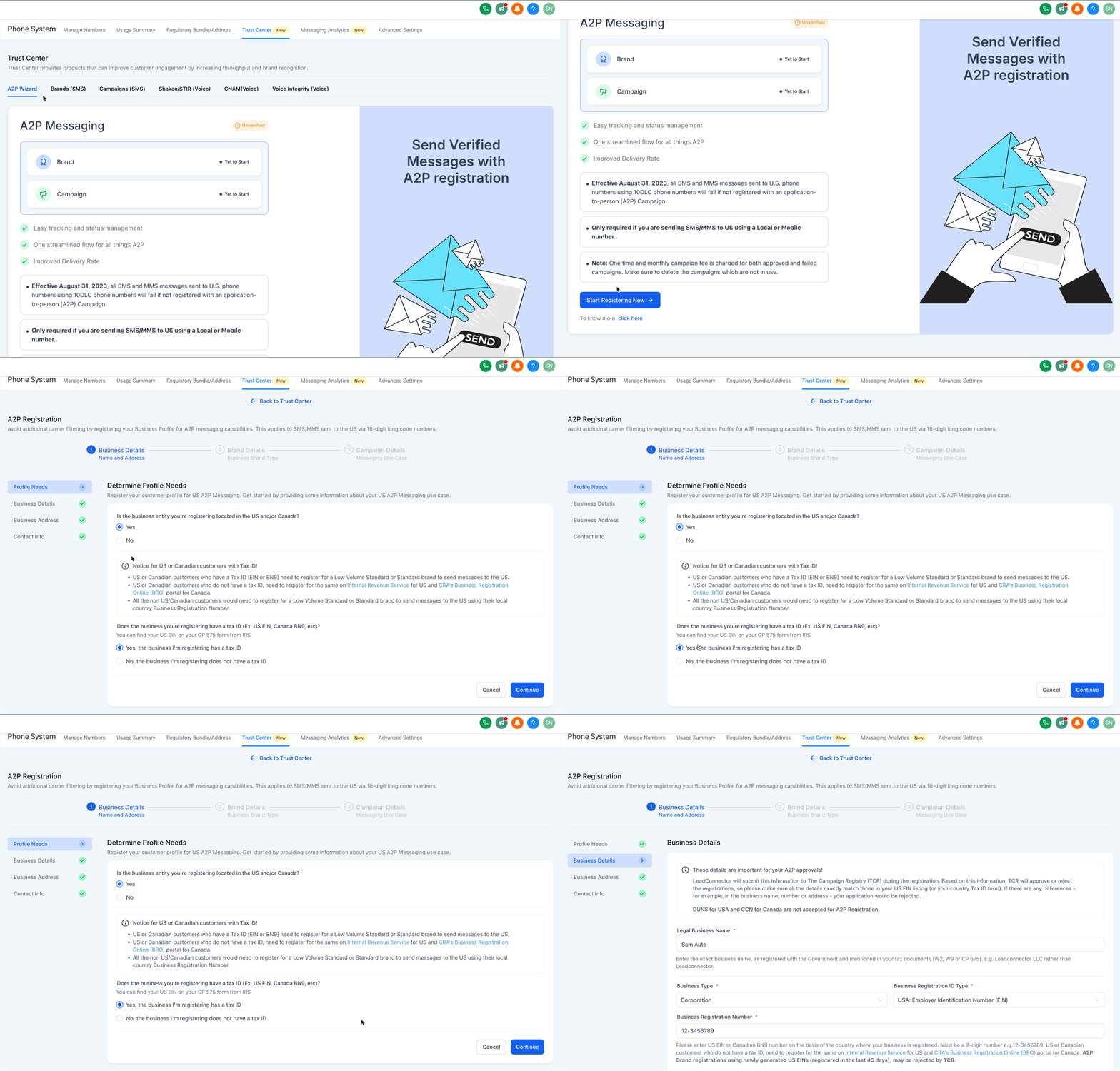
Select Yes for 'Is the business entity you're registering located in the US and/or Canada?' option.
Select 'Yes, the business I'm registering has a tax ID' option.
Click on Continue.
Step 3: Add Business Details
Enter Legal Business Name as registered with the Government and mentioned in your tax documents (W2, W9 or CP 575). E.g. Leadconnector LLC rather than Leadconnector.
Enter your Business Type from the list.
Choose your Business Registration ID Type from the list.
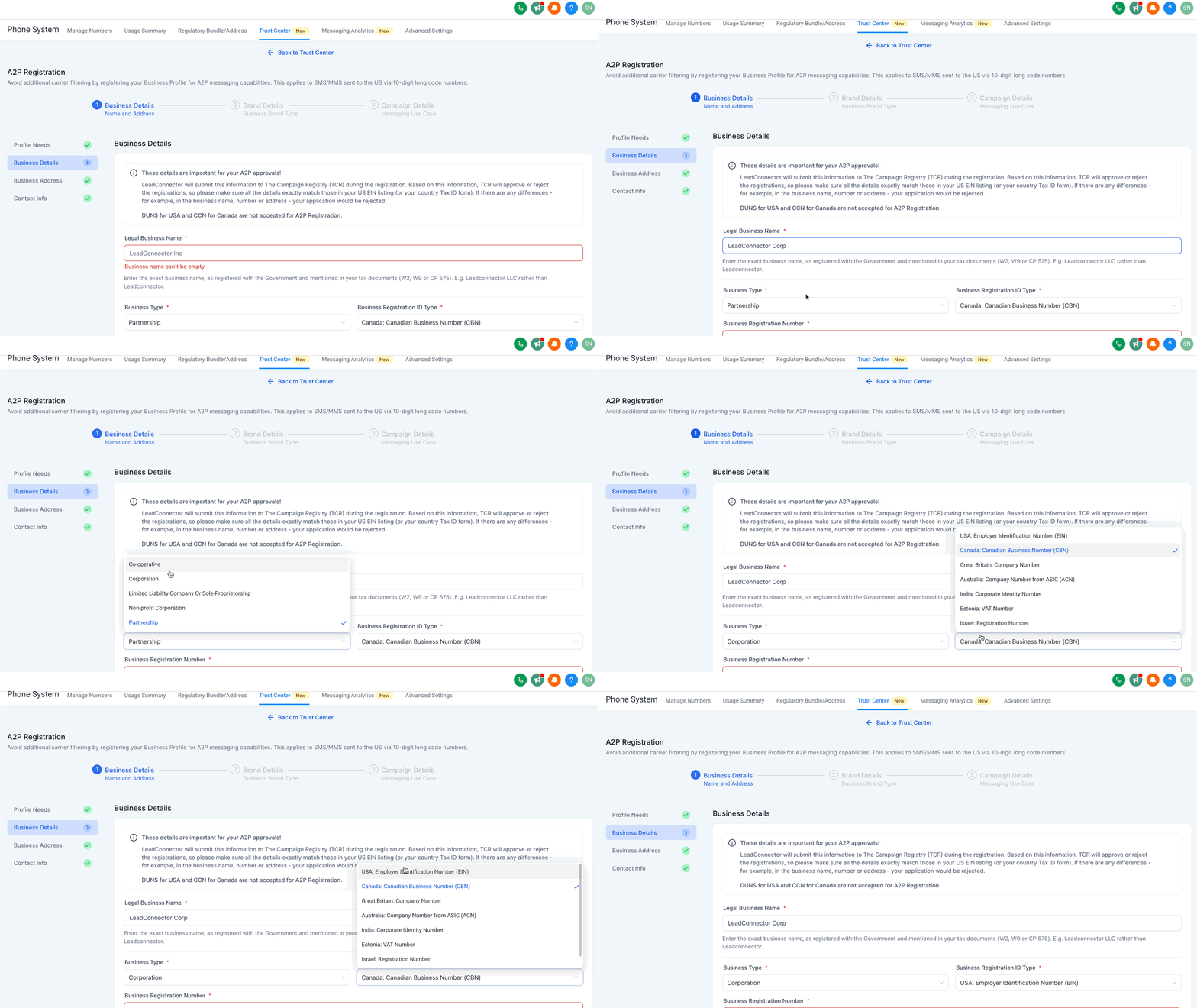
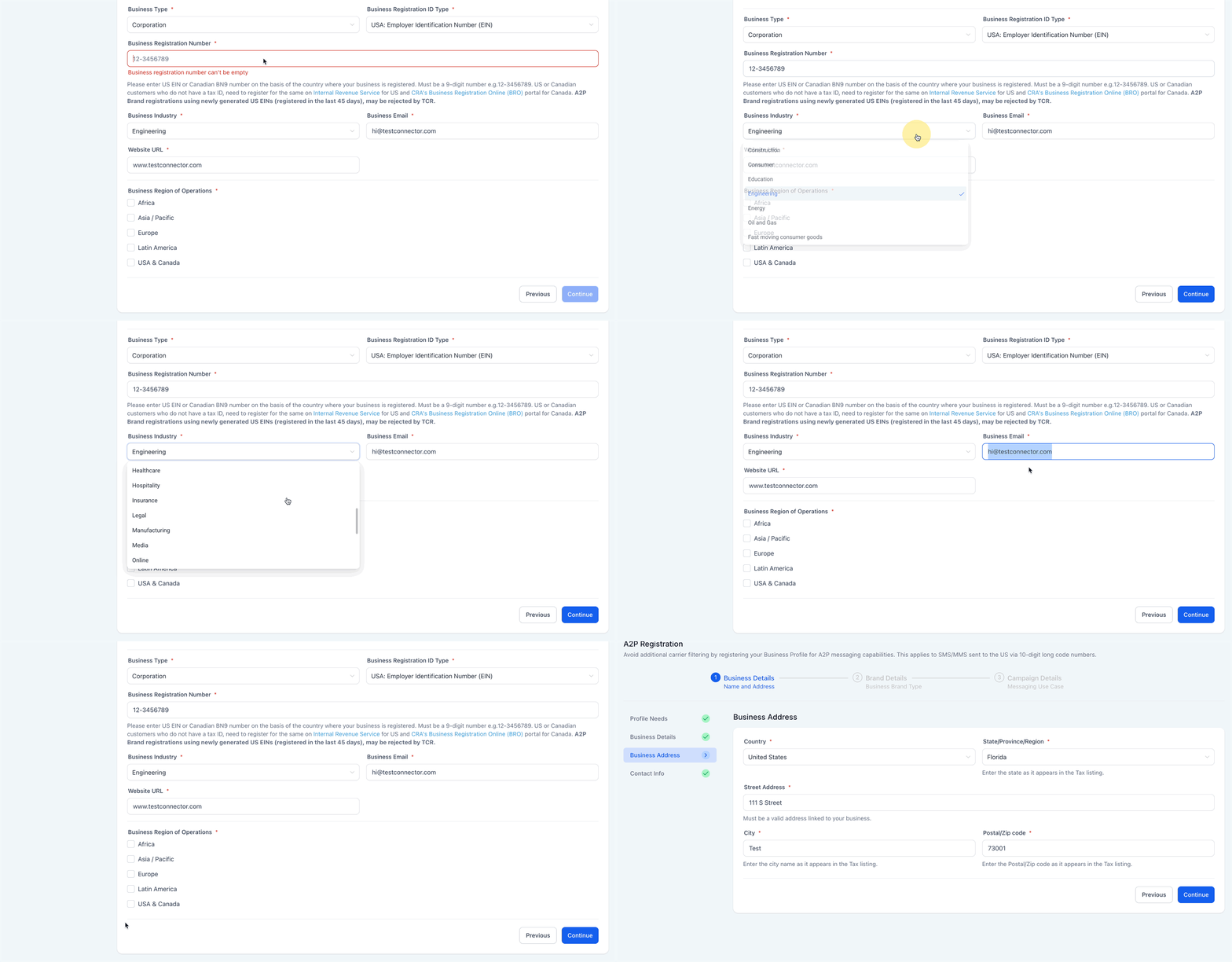
Enter your Business Registration Number as per your country.
Select your Business Industry from the list of available industries.
Enter your Business Email.
Add your Website URL.
Select your Business Region of Operations from the list.
Click on Continue.
Important: A2P Brand registrations using newly generated US EINs (registered in the last 45 days), may be rejected by TCR.
Step 4: Add Business Address
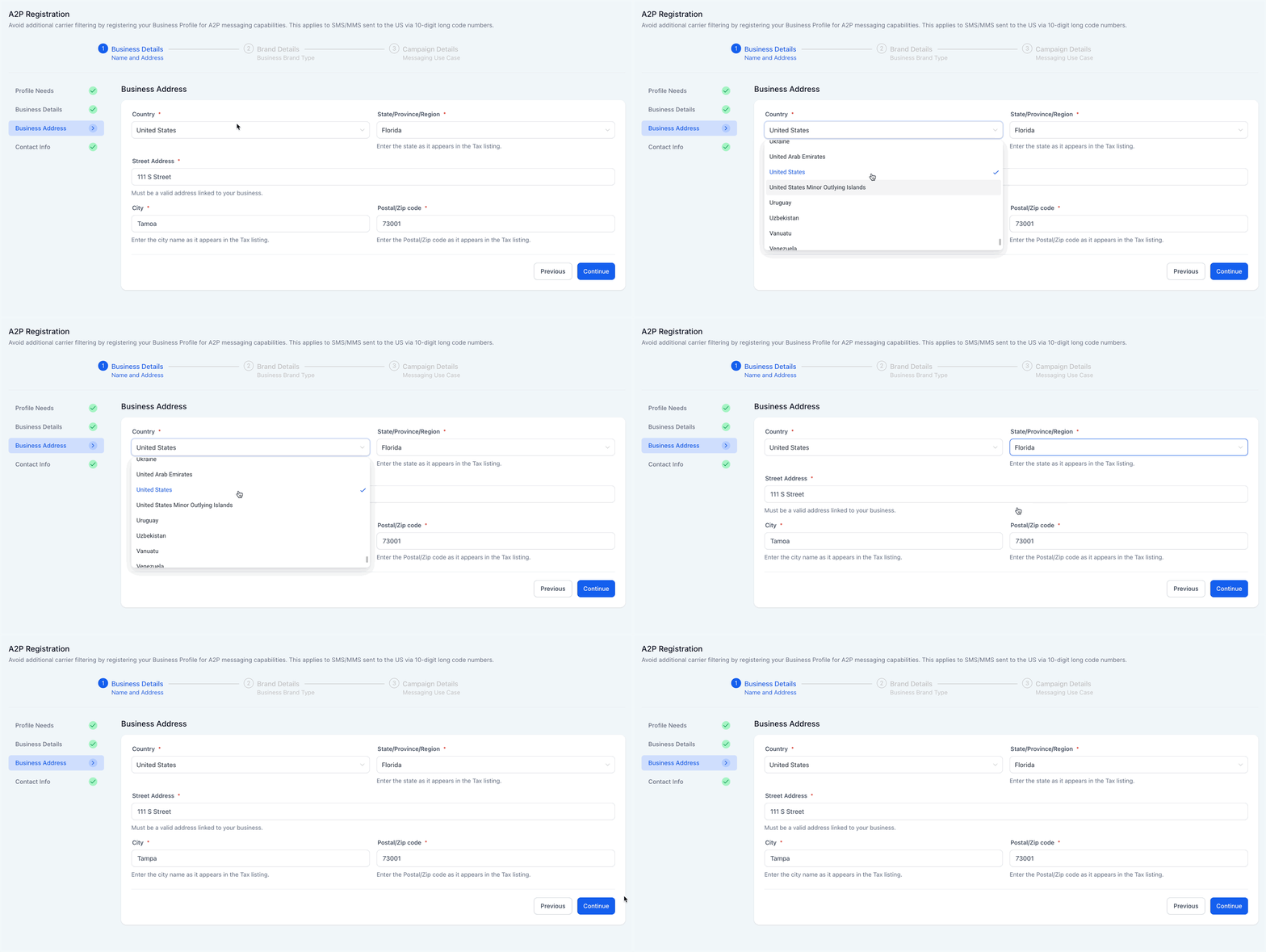
Select your Country from the list.
Select State/Province/Region as it appears in the tax listing.
Add Street Address which must be a valid address linked to your business.
Enter City as it appears in the tax listing.
Enter Postal/Zip Code as it appears in the tax listing.
Click on Continue.
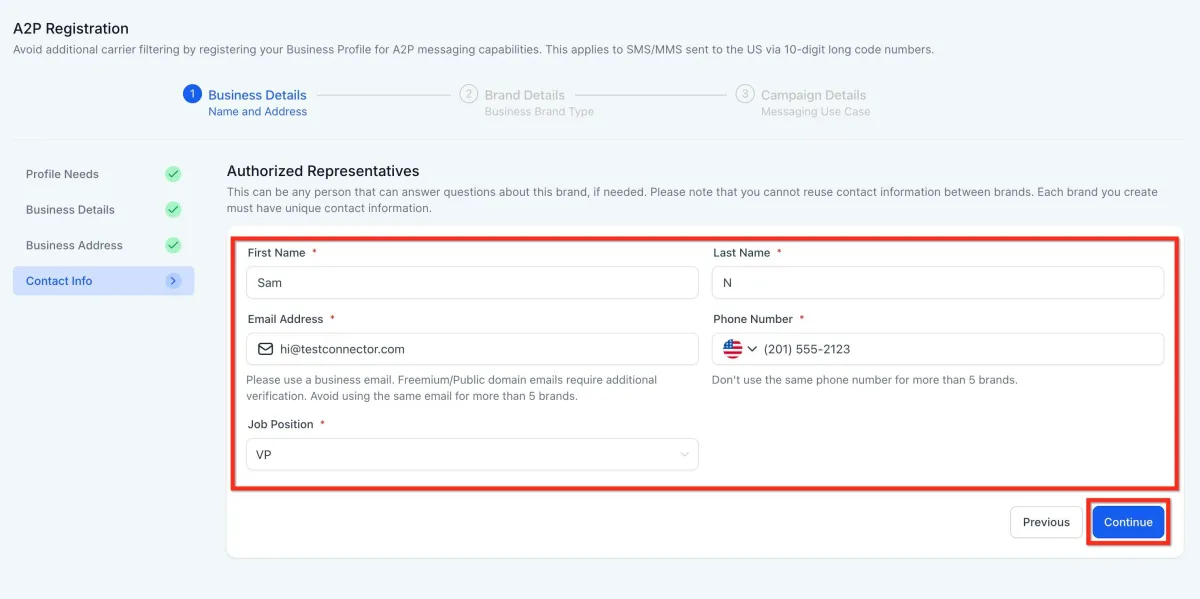
Step 5: Add Contact Info of Authorized Representatives
Add your First and Last Name.
Add your Email Address. (Use a business email like [email protected] not @gmail or @outlook.com)
Add your Phone number as per your country.
Select Job Position from the list or select Other and add your job position.
Click on Continue.
Note: One email can be used for max 5 brands. Please use different email if you have already used the email for more than 5 brands.
IMPORTANT: Once you click "Continue" or submit your contact details, you will now have to validate this through an OTP sent to your email address. It validates each email address by sending a unique 6-digit one-time password to ensure the sender’s identity is genuine.
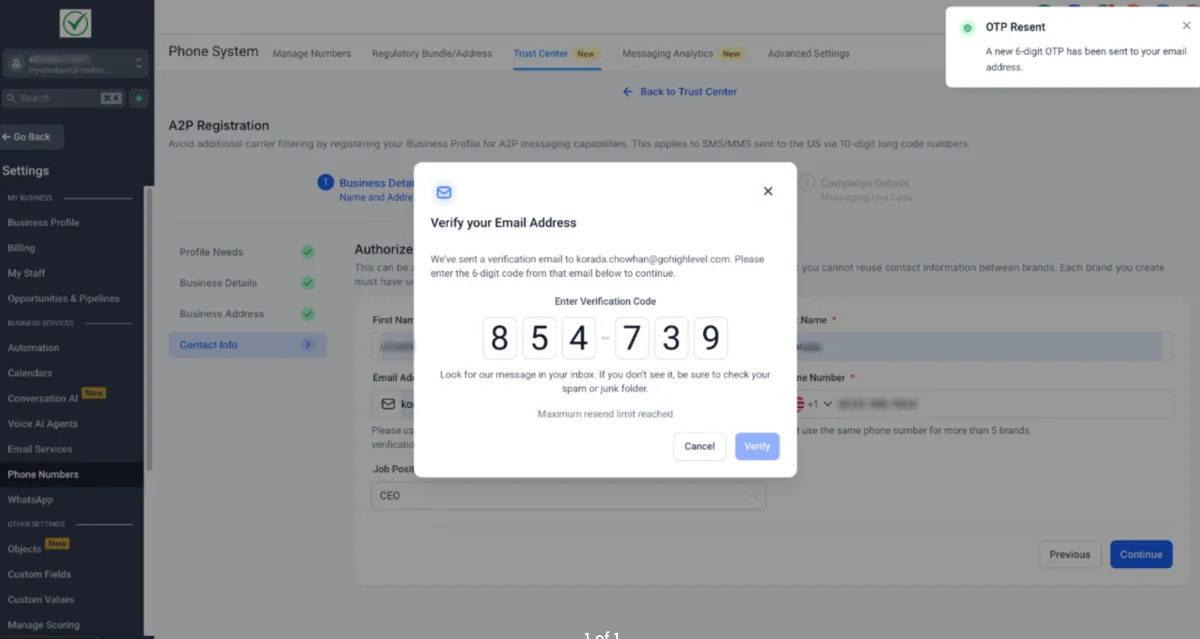
This new step strengthens the integrity of brand registrations and helps protect the platform from misuse without disrupting the experience for legitimate users. For more, refer to Email OTP Verification for Secure A2P Brand Registration.
Step 6: Choose Your Business Use Case
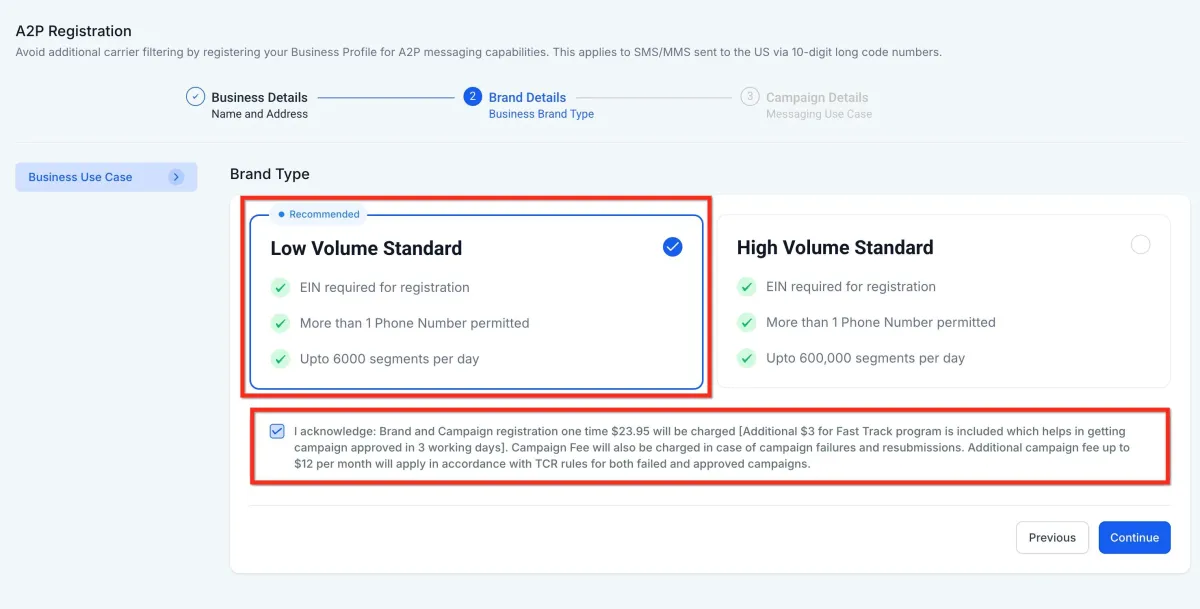
The Business Brand Type will be automatically set to "Low/High Volume Standard" based on the responses provided under Profile Needs.
1. Low Volume Standard
It is designed for businesses with a valid EIN that need moderate-scale messaging capabilities using 10DLC.
Requires a valid EIN (Employer Identification Number)
Supports multiple phone numbers
Allows up to 6,000 SMS segments per day
One-time registration fee of $23.95 (includes $3 Fast Track fee for approval within ~3 business days)
Additional monthly campaign fee up to $12/month as per TCR rules
2. High Volume Standard
It is suited for larger businesses with high messaging needs, offering extensive daily capacity and multiple phone number support.
Requires a valid EIN
Supports multiple phone numbers
Allows up to 600,000 SMS segments per day
One-time registration fee of $68.05 (includes $3 Fast Track fee for approval within ~3 business days)
Additional monthly campaign fee up to $12/month as per TCR rules
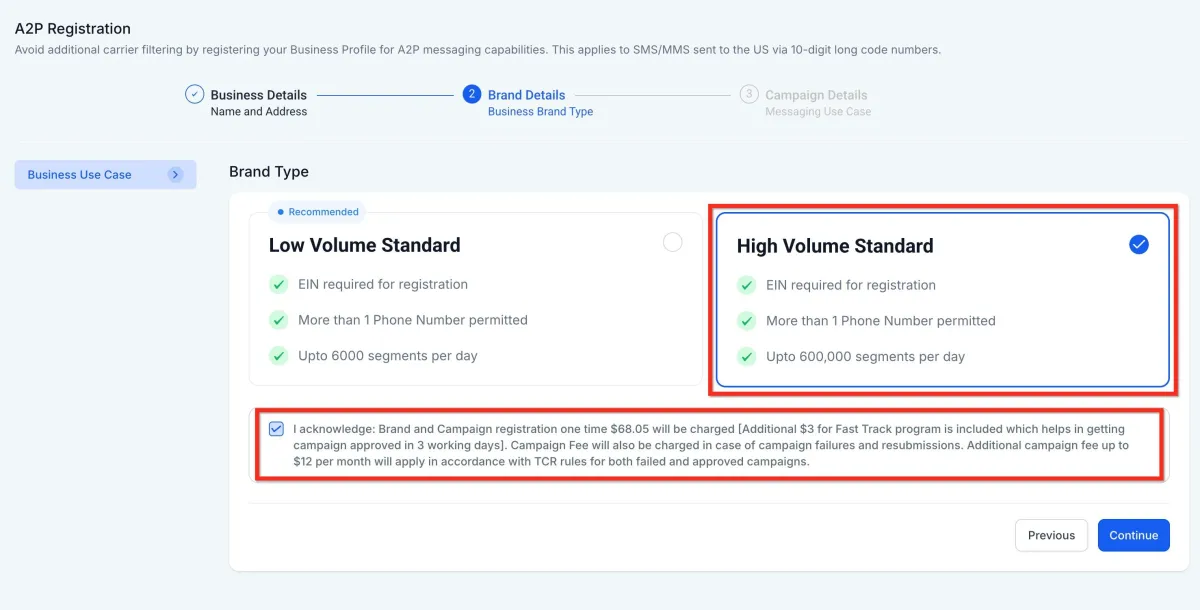
3. Select the Brand Type as per your need and click on Continue.
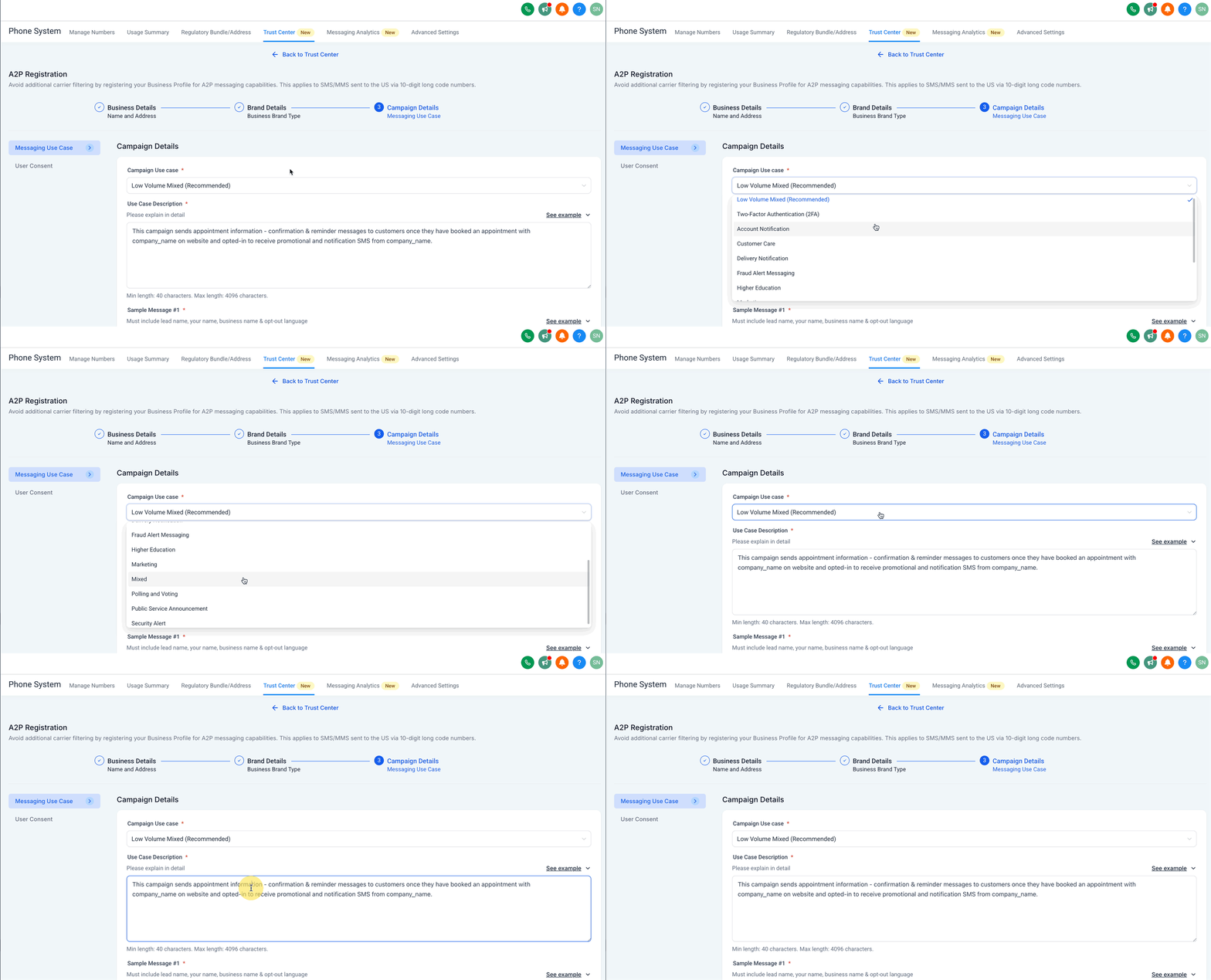
Step 7: Add Campaign Details
From the Campaign Use Case dropdown, select Low Volume Mixed or Mixed (recommended). You can also select a specific use case as per your need from the list.
In the Use Case Description field, explain what the campaign will be used for.
Example: This campaign sends appointment information - confirmation & reminder messages to customers once they have booked an appointment with company_name on website and opted in to receive promotional and notification SMS from company_name.
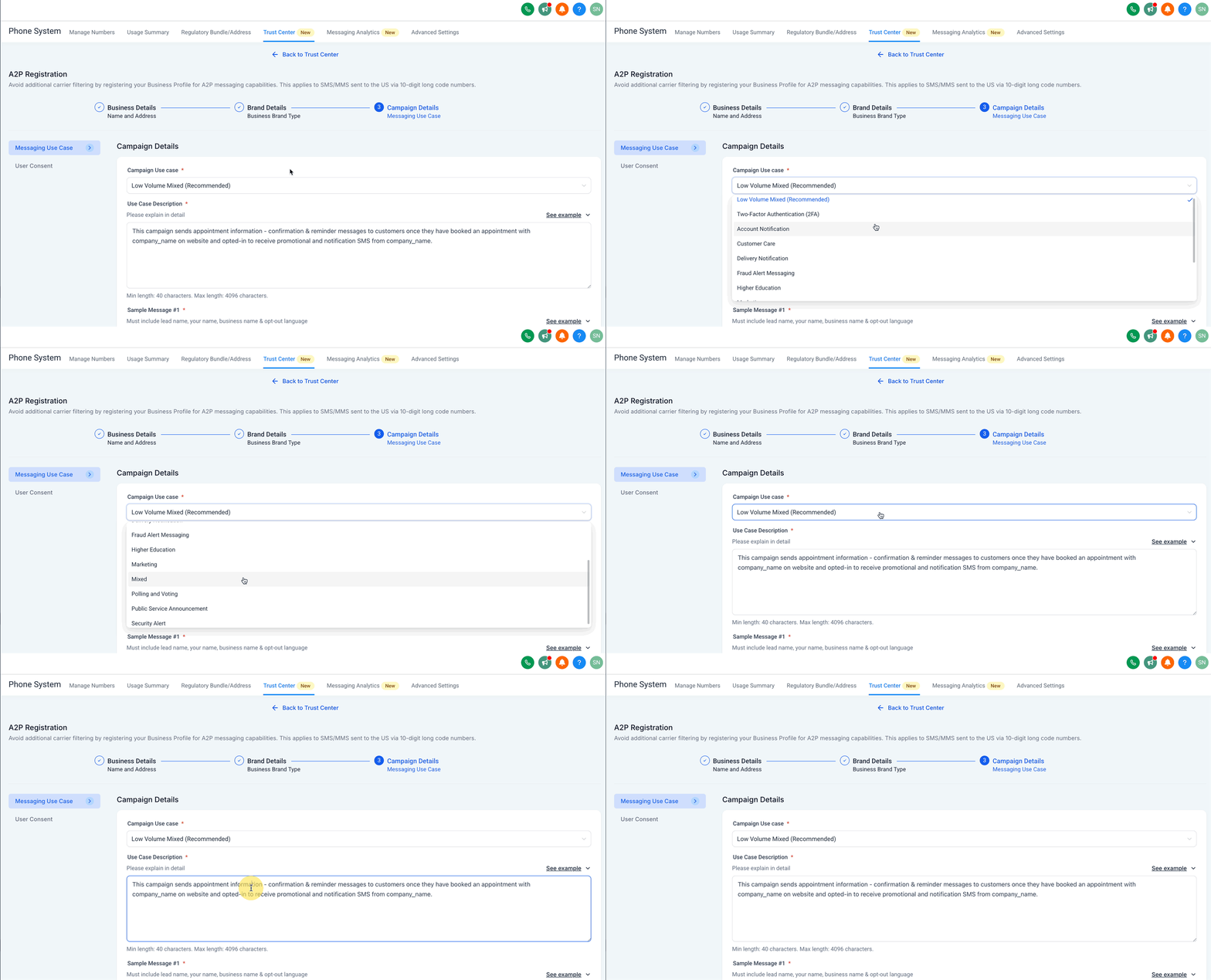
Note: If you have an EIN but use a different brand name, include “We are doing DBA as [Business_Name]” in the Campaign Use Case Description. You can register up to 10 brands per EIN.
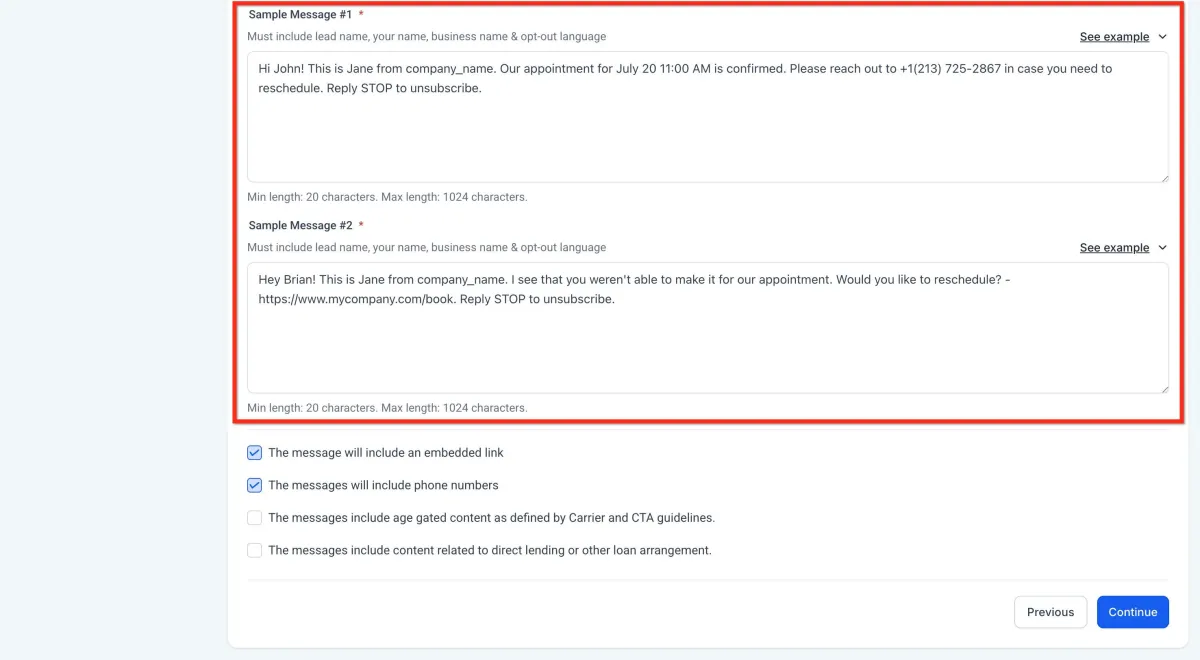
Add Sample Message #1 & #2
A. In the Sample Message #1 field, provide a message that includes:
Lead's Name
Your name
Business name
Opt-out language (e.g., Reply STOP to unsubscribe)
Example: Hi John! This is Jane from company_name. Our appointment for July 20 at 11:00 AM is confirmed. Please reach out to (phone number) if you need to reschedule. Reply STOP to unsubscribe.
B. Provide a second sample message in the Sample Message #2 filed with the same required elements as above.
Example: Hey Brian! This is Jane from company_name. I see you weren't able to make it to our appointment. Want to reschedule? - https://www.mycompany.com/book. Reply STOP to unsubscribe.
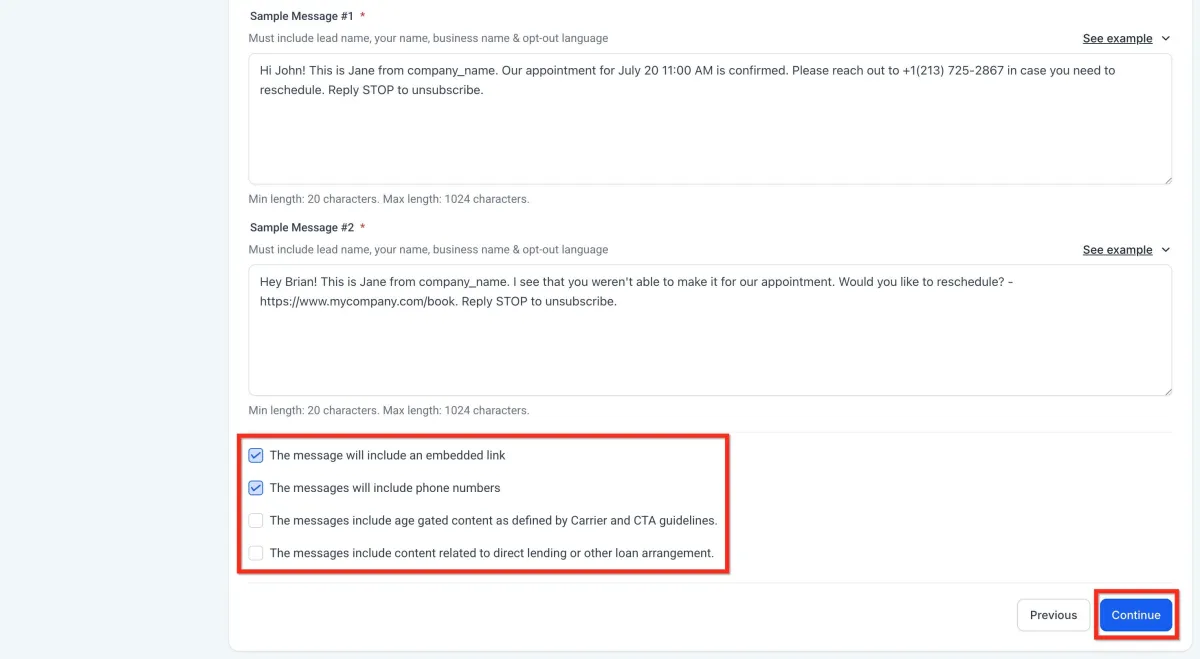
Choose Content Included in Your Messages
Select the options that your messages might include:
The message will include an embedded link.
The messages will include phone numbers.
The messages include age-gated content as defined by Carrier and CTA guidelines.
The messages will include content related to direct lending or other loan arrangements.
Click on Continue.
Step 8: User Consent
To comply with carrier regulations, you’ll need to provide details on how your contacts give consent to receive messages and what your opt-in message looks like. Follow these steps:
Describe the Consent Process:
In the "How do lead/contacts consent to receive messages?" field, explain how users opt in.
Be specific about the method (e.g., website form, SMS keyword).
Example: End users opt in by visiting https://www.mycompany.com/book and filling in their details. They check a box to receive notifications and promotional messages. Users can also text START to +1 (213) 725-2867 to provide consent.
Add the Opt-in Confirmation Message
In the "Opt-in Message" field, enter the confirmation message users receive once they’ve opted in.
This message must:
Include your business name.
Include the opt-out keyword like STOP.
Example: You have successfully opted in to receive notifications and promotional SMS from company_name. Reply STOP to unsubscribe.
Click on Submit.
⚠️ IMPORTANT NOTE:
Ensure all registration information matches government records exactly.
Non-compliance or errors will result in rejection and additional fees.
Consult a legal professional if unsure about privacy policy, terms of service, or messaging language.
Be aware of Sev-0 fines for prohibited content, which can range from $500-$2,000 per violation.
Terms of Service Requirements
Include these components:
➤ Program Name and Description (name of your SMS program and description of message types)
➤ Opt-Out Instructions (texting "STOP" to the shortcode)
➤ Rejoining Instructions (how to rejoin after opting out)
➤ Help Instructions (texting "HELP" or contacting support)
➤ Carrier Liability Disclaimer (carriers not liable for delayed/undelivered messages)
➤ Message and Data Rates disclaimer
➤ Privacy Policy Link
➤ Compliance with Industry Standards statement
➤ Legal Compliance Note
Privacy Policy Requirements
1. Generate a privacy policy using services like Termly, Rocket Lawyer, or free online generators
2. Include the following statements:
➤ No mobile information will be shared with third parties or affiliates for marketing/promotional purposes
➤ Text messaging originator opt-in data and consent will not be shared with any third parties, except for aggregators and providers of the Text Message services
➤ If your policy mentions sharing personal information, add this disclaimer: All the above categories exclude text messaging originator opt-in data and consent; this information will not be shared with any third parties, excluding aggregators and providers of the Text Message services.
3. Remove terms like "share," "sell," "affiliate," or "third-party" when they imply sharing leads' information, unless explicitly allowed
4. In both the privacy policy and terms and conditions pages, remove all keywords such as 'share,' 'sell,' 'affiliate,' or 'third-party' that mention selling or sharing leads' information with a third party.
5. Provide the working Privacy Policy URL. It must not mention sharing of personal information with any third parties/affiliates/nonaffiliates. If it does mention this, the following disclaimer must be added
6. How do we share your information section of the privacy policy:
"All the above categories exclude text messaging originator opt-in data and consent; this information will not be shared with any third parties, excluding aggregators and providers of the Text Message services."
A compliant Privacy Policy must state that no mobile information will be shared with third parties/affiliates for marketing/promotional purposes. Information sharing to subcontractors in support services, such as customer service is permitted. All other use case categories exclude text messaging originator opt-in data and consent; this information will not be shared with any third parties.
Best Practices for Privacy Policy
1. Find Keywords: Look for words like share, disclose, sell, affiliate, and third-party.
2. Check Context: See if the sentence allows sharing or selling leads' information with others.
3. Remove or Fix: Delete or reword any text that says leads' information is shared or sold.
4. Confirm: Make sure the policy clearly states that you don’t share or sell leads' information.
5. Must add this paragraph:
➤ "No mobile information will be shared with third parties/affiliates for marketing/promotional purposes. Information sharing to subcontractors in support services, such as customer service is permitted. All other use case categories exclude text messaging originator opt-in data and consent; this information will not be shared with any third parties."
Industry Standards for US Short Code Terms of Service
To ensure your short code campaign aligns with LC Phone's requirements, your company must adhere to carrier compliance requirements, industry standards, and applicable law.
As per industry standards, it is necessary to have a publicly accessible mobile terms of service page for each US short code program. This mobile terms of service should include specific provisions such as customer support contact information, complete opt-out instructions (displayed in bold), a recurring message disclosure (if applicable), a product description, and a program (brand) name. Additional requirements may exist for certain programs like sweepstakes or contests. For more information on industry standards, please refer to the CTIA’s Short Code Monitoring Handbook.
Beyond these standards, there may be additional compliance requirements under applicable law based on the nature of your text messaging campaign. It is advisable to consult with your legal counsel to ensure that your terms of service and privacy policy are compliant with applicable law and consistent with standards for your specific campaign and industry.
New Sev-0 Fines on Prohibited A2P Traffic, Effective February 15, 2024
T-Mobile has introduced A2P 10DLC non-compliance fines for messages including prohibited content. If T-Mobile detects any messages that violate the tiers listed below, they will issue a Sev-0 violation (the most severe consumer violation), a non-compliance fine, and carriers will immediately block the offending messages.
This applies to all commercial messaging non-consumer A2P products (SMS or MMS short code, toll-free, and 10DLC) that traverse the T-Mobile network.
Because Sev-0 violations also infringe on Virelynx acceptable use and messaging policies, Virelynx will pass on these fines to you for every Sev-0 violation, starting February 15, 2024. These fines include, but are not limited to, the following:
➤ Tier 1: $2,000: phishing (including simulated phishing sent for security testing or similar purposes), smishing, and social engineering. Social Engineering is a technique used to manipulate someone into sharing private information, like passwords or credit card numbers.
➤ Tier 2: $1,000: illegal content (content must be legal federally and in all 50 states)
➤ Tier 3: $500: all other violations in commercial messaging including but not limited to, SHAFT (sex, hate, alcohol, firearms, and tobacco) that do not follow federal and state law and regulations (e.g. age-gate).
These non-compliance fines apply to violations across any A2P messaging product (SMS/MMS short code, toll-free, and 10DLC).
T-Mobile reserves the right to permanently suspend any brands, campaigns, and your company’s access to the T-Mobile Network in the event violations are deemed to be excessive. If you are subject to these fines, HighLevel will send you a Sev-0 violation notice and will subsequently charge the respective fine amount.
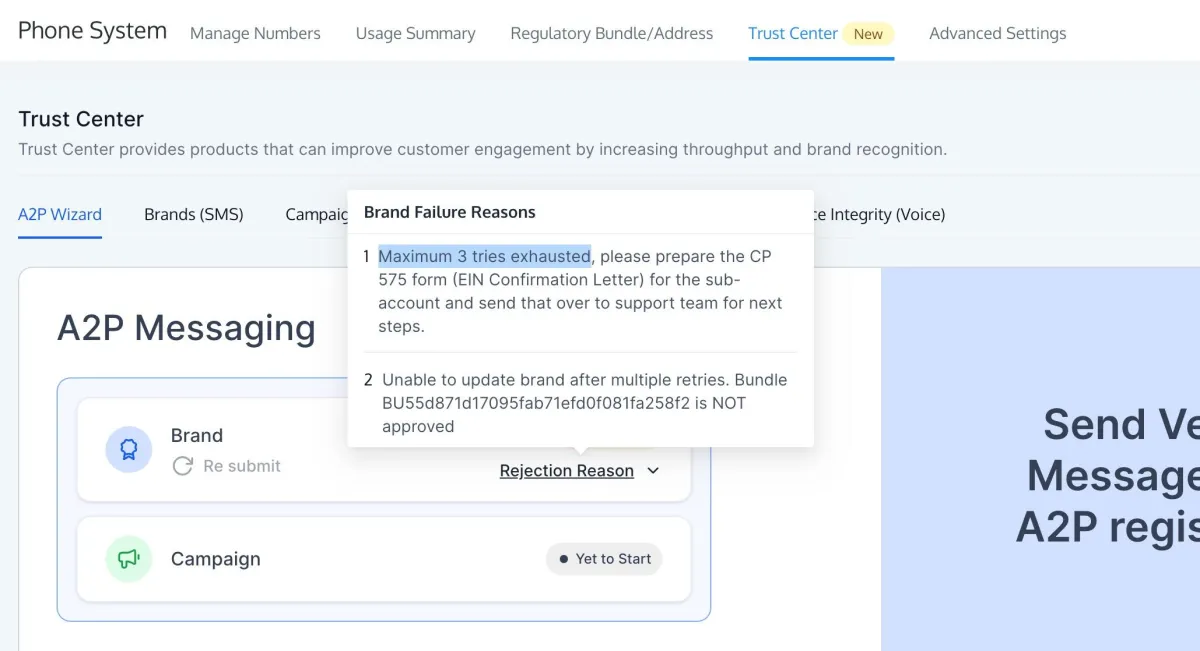
Handling the "Maximum 3 Tries Exhausted" Error
If you see the error "Maximum 3 tries exhausted", please fill out this form once you have collected the CP 575 Form. It means the registration attempts have failed due to mismatched or invalid business details.
Next Steps:
Obtain your CP 575 EIN Confirmation Letter (or request a 147c letter from the IRS if the CP 575 is unavailable).
Upload your business registration form in your support communication with us.
Email or send a screenshot of your CP 575 form to the Virelynx team.
We will submit this documentation on your behalf for Brand approval.
Important Tips:
Ensure the legal business name and EIN number exactly match what’s shown on the CP 575 form.
Do not use the business name found on W2 or W9 forms, as they may differ.
If the business name spans multiple lines on your CP 575/147c letter, you must enter all lines above the address line during registration.
Example:
ABC Holding Group Inc.
Division of Regional Services
123 Main Street
New York, NY 10001
The legal name to enter would be: ABC Holding Group Inc. Division of Regional Services
Understanding Trust Scores & Throughput
Once submitted, your brand will be vetted and assigned a Trust Score (0–100) by TCR.
Higher scores allow for higher Message Throughput (MPS) and better delivery rates. The Trust Score is determined based on your submitted information — EIN match, business type, domain verification, and more.
Message throughput (MPS) and Trust Scores for A2P 10DLC in the US
Under the new A2P 10DLC service for sending messages via 10-digit long code numbers in the United States, there are changes to how message sending throughput is allocated. A2P 10DLC message throughput in the US will now be determined based on your Brand type, Campaign type (use case), and Trust Score (for Standard Brands). This guide gives an overview of these changes, and how throughput is allocated.
T-Mobile will also impose daily message limits toward their subscribers. This is separate from message sending throughput. See T-Mobile daily message limits for long code messaging with A2P 10DLC for details.
Throughput overview
Message sending throughput for SMS is measured in message segments per second (MPS). Each message segment consists of up to 160 GSM-7 encoded characters, so an SMS with more characters and/or different character encoding can be comprised of multiple segments. For full details, see What The Heck Is A Segment.
In the past, MPS for US long code numbers was set at a standard 1 MPS per number, shared across all mobile carriers. This rate is changing under the new A2P 10DLC service. Going forward, MPS throughput will be determined based on the sender's Brand type, Campaign type (use case), and Trust Score (for Standard Brands).
What is a Trust Score?
A Trust Score is a score assigned during Standard Brand registration with The Campaign Registry (TCR - the 3rd party that administers the US wireless carriers' new registration system). When an A2P Customer Profile registration for US 10DLC messaging is submitted, we send this information to TCR for review. Virelynx also submits the Brand for "secondary vetting," which assigns a score from 0 to 100 and gives access to higher default throughput and message limits toward US mobile carriers.
The Standard Brand registration process uses a reputation algorithm to review specific criteria relating to your company, and then assigns a “Trust Score”. In short, the higher your Trust Score, the higher your messaging throughput (MPS). Note: Sole Proprietor and Low Volume Brands do not go through "secondary vetting", are not assigned a Trust Score. Throughput is fixed based on their corresponding use case.
Trust Scores are static and do not automatically change over time.
T-Mobile will also impose daily message limits toward their subscribers. See T-Mobile daily message limits for long code messaging with A2P 10DLC for complete details.
What if I am not satisfied with my Trust Score? Can I appeal?
Low Trust Scores can result from the following:
Data discrepancies in the information you submitted in your A2P registration, such as a different address than the one associated with your official business registration number (e.g. EIN).
A small brand footprint
In general, smaller organizations and those with less business presence will receive lower scores.
If you receive a low Trust Score, Virelynx will do our best to offer guidance on possible causes or resolutions for a low score. If this applies to you, please contact Virelynx support.
For more information about resubmitting brands, please see our product documentation on Resubmitting Standard/LVS Brands.
How is throughput (MPS) allocated for A2P 10DLC?
A set maximum MPS is granted for each of your registered campaigns (use cases). This MPS is shared across all US/Canada long code numbers allocated to your campaign, and all wireless carriers. Whether you choose to send messages over a single number to a specific carrier, or split up messages over a collection of local numbers to multiple carriers, the same MPS limit applies.
You will also need to factor in Account Based Rate Limiting, which is an upper MPS limit set at the account level, combined across all senders. For example, if you have an Account Based Rate Limit of 100 MPS, with three A2P 10DLC Campaigns approved on the same account for 75 MPS each, you'll still be limited to 100 MPS combined across all Campaigns. This will not prevent you from sending at a combined 225 MPS to the Virelynx Messaging API in this scenario, but each message segment that exceeds that 100 per second will be placed in queue.
Specific Use Cases (what carriers call “Declared” Campaigns) may receive higher MPS for the same Trust Score than a “Mixed” or Marketing type Use Case.
For a full list of Use Case and Campaign types as defined by carriers, and their respective per-message fees and other considerations, see List of Campaign Types and Use Case Types for A2P 10DLC registration.
Is Toll-Free SMS throughput affected?
No. Toll-Free SMS is not affected by the throughput changes described in this article, nor is it subject to the new campaign registration requirements. A US Toll-Free number has a total of 3 MPS toward all US and Canada carriers by default. You can request higher message throughput for a US Toll-Free number by contacting our Sales team.
Is messaging to countries other than the United States affected?
No.
Current status of message throughput in A2P 10DLC
The Trust Score you receive (for Standard Brands), and the Campaign type you select, will dictate the throughput of your long code numbers toward AT&T, Verizon, and T-Mobile. Please review the respective table below based on your selected Campaign type for specific MPS information.
Declared Use Cases: Message Throughput
A Declared use case means you have chosen one specific non-marketing use case (examples: 2FA, Account Notifications, etc.). For a full list, see List of Campaign Types and Use Cases.
*Your messages toward the US Cellular mobile network will be based on your major network throughput, up to a maximum of 8 MPS; your MPS toward all other minor US carriers (small independent carriers comprising less than 5% of the overall mobile market share) will be 1 MPS per phone number.
Mixed / Marketing Use Cases: Message Throughput
Mixed / Marketing use cases can be registered for customers who want to send messages for multiple use cases from the same set of numbers, or for marketing. Different throughput levels are allocated for Mixed / Marketing use cases than for Declared use cases.
Please note, in addition to the "Mixed / Marketing" use case, there is a separate Campaign use case designated as "Low Volume Mixed" – this option has a lower monthly fee than a standard Campaign, but is fixed at the lowest throughput tier below, regardless of your Trust Score.
*Your messages toward the US Cellular mobile network will be based on your major network throughput, up to a maximum of 8 MPS; your MPS toward all other minor US carriers (small independent carriers comprising less than 5% of the overall mobile market share) will be 1 MPS per phone number.
Sole Proprietor Use Cases: Message Throughput
Sole Proprietor Brands are available for individuals or small businesses without a tax ID sending low-volume messaging. Sole proprietor brands are limited to 1 Campaign, 1 phone number per Campaign, and a throughput limit of 1 MPS. Sole Proprietor Campaigns do not have a Trust Score, and have a fixed throughput as well as limits of 1000 msg/day (T-Mobile) and 15 msg/minute (AT&T) per Campaign. If more throughput is desired, the business should be registered as a Standard Brand.
*Your messages toward all minor US carriers (small independent carriers comprising less than 5% of the overall mobile market share) will be 1 MPS.
** A Sole Prop Campaign can contain up to 1 US/Canada long code numbers. All numbers will share 0.25 MPS toward AT&T, but each number will get 1 MPS toward T-Mobile and 1 MPS toward Verizon. This adds up to a maximum of 2.25 MPS toward the major US networks.
FAQs
Q: What’s the difference between Sole Proprietor and Standard Brand?
Sole Prop is for individuals without an EIN. Standard Brand is for registered U.S. businesses with an EIN.
Q: Why was my brand rejected?
Likely reasons include EIN mismatch, invalid website, or use of a PO Box.
Q: Can I add new numbers after completing A2P Brand and Campaign Registration?
Yes. Any numbers you add after your brand and campaign are approved will be automatically registered under the same campaign — no resubmission is needed. It may take several days for registration to complete.
Q: Can I register multiple campaigns under one Standard Brand?
Yes, you can register multiple use-case-specific campaigns.
Q: I don't want to deal with all of this. Is there any alternative for me and my clients?
Yes, you can bypass A2P 10DLC by switching to Toll-Free Numbers. These also require registration, but the process is free and less complex. You can continue messaging in the U.S. without A2P 10DLC restrictions. See: Toll-Free Verification Guide for LC - Phone (US/Canada)
Q: How do we move from low volume sending to higher volume sending?
Please reach out to [email protected]. We’ll share a form that you can submit, and our team will create the brand and campaign manually in the backend for increased throughput.
Q: Does this apply to only marketing campaigns or does it apply to all SMS?
A2P 10DLC is applicable for all Application-to-Person texting like marketing SMS, reactivation campaigns, appointment reminders, prospecting, billing alerts, 2FA login codes, etc.

Virelynx is the apex automation engine, purpose-built for growth-driven entrepreneurs, marketers, and agencies who demand efficiency without compromise. By fusing CRM precision with agile automation, it streamlines every moving part of your business, from lead capture to client retention.
© 2025 Virelynx All Rights Reserved.