
How to Create an Affiliate Program in Virelynx?
Launching an affiliate program is a powerful way to expand your sales reach, and Virelynx makes it easier than ever with its built-in Affiliate Manager.
In this guide, we’ll walk you through how to create an affiliate program in Virelynx, focusing on the platform’s affiliate program feature.
You’ll learn how to set up affiliate campaigns, configure commission structures (including multi-tier commissions), manage affiliates, and leverage the affiliate portal. By the end, you’ll be able to confidently use Virelynx’s Affiliate Manager to grow your business – and if you’re new to Virelynx, you can even follow along with a 14-day free trial to test these features risk-free.
What is the Virelynx Affiliate Manager?
Virelynx’s Affiliate Manager is an all-in-one tool inside the platform that allows you to create and manage your own affiliate program for the products or services you sell
Instead of using third-party affiliate software, you can recruit affiliates, track their referrals, and pay commissions directly within Vireylnx. The Affiliate Manager is located under the Marketing menu in your Virelynx dashboard (look for the “Affiliate Manager” tab)
It consists of several components to help you run a successful program, including:
Campaigns: where you set up affiliate offers/campaigns for specific products or funnels. Each campaign generates unique affiliate links for tracking.
Affiliates: a database of the individuals or businesses promoting your product. You can add affiliates manually, import them, or even automate their addition (more on this later).
Commissions & Payouts: tools to define commission rates (flat or percentage) and manage payouts. You can track commissions earned, mark them as paid, and even integrate with payment gateways like PayPal for automatic payouts.
Multi-Tier Structure: support for up to 7-tier affiliate programs, meaning your affiliates can recruit sub-affiliates and earn override commissions This is great for incentivizing referrals of new affiliates and building an affiliate team.
Media Library: a place to upload marketing assets (banners, logos, videos, etc.) that your affiliates can use to promote your campaign.
Affiliate Portal: a dedicated portal where affiliates can log in to see their referral links, track clicks/leads/sales, and monitor their commissions in real time
Why use Virelynx for your affiliate program? There are many benefits: it’s built directly into your CRM and funnel system, so all your data is in one place; it supports advanced features like multi-tier commissions and lead tracking out of the box; and you can automate a lot of the affiliate management tasks using Virelynx’s workflows. In short, Virelynx provides a central hub to track, manage, and optimize affiliate campaigns without needing any external software.
Step-by-Step:
Setting Up an Affiliate Campaign in Virelynx.
In Virelynx, an affiliate campaign is essentially the affiliate program for a specific product or set of products. This is where you define what affiliates are promoting and how they’ll be compensated. Virelynx makes the setup straightforward with a guided process. Let’s go through the key steps to create your affiliate campaign:
Prerequisite to Launch Your First Affiliate Campaign
Before you can launch your first affiliate campaign, make sure to complete the following steps:
Enable Stripe Connect: Set up Stripe Connect for payments (Go to Settings > Integrations > Stripe Connect). Learn more here.
List Your Products: Products can be listed in the following areas:
Funnels: Guide to adding products to funnels.
Website: Learn how to add products to your website.
Online Stores: Set up an online store.
Track Leads: Use Forms, Surveys, or Calendars to track leads that your affiliates generate.
Connect PayPal Business: For quick and easy affiliate payouts, link your PayPal Business account. Learn more here.
Step 1: Access the Affiliate Manager and Add a New Campaign
First, log in to your Virelynx account and navigate to Marketing > Affiliate Manager > Campaigns. Here you’ll see a list of any existing affiliate campaigns (if you have none yet, it will be empty). Click the “+ Add” button to create a new affiliate campaign, Virelynx will open the campaign setup form.
Give your campaign a clear name. In the Campaign name field, enter a descriptive name for your affiliate program. For example, if you are creating an affiliate program for a course, you might name it “Spring 2025 Course Affiliate Program.” A clear name helps you identify the campaign later if you run multiple programs.
Step 2: Choose Your Campaign Source (Funnel or Website)
Next, choose the source for your campaign – this is the funnel, website, or online store that affiliates will be promoting.
In the campaign setup form, under “Referral/lead sign up link”, select the type of source (Funnels, Websites, or Stores) and then select the specific funnel/website and the page that you want affiliates to drive traffic to. This page will be the landing page where potential customers arrive via the affiliate’s link.
Funnels or Websites: Typically you’ll pick a funnel page or website page where your product is sold or where a lead sign-up happens. Make sure the funnel or site has its own domain set up; Virelynx requires a dedicated domain for accurate link tracking
Stores: If you use Virelynx’s store feature, you can select a product page from your store.
External Website: (New feature) Virelynx now even allows external URLs as the affiliate link destination.
This means you could track affiliates promoting a page outside of Virelynx by installing a tracking script on that site.
However, for most users, a Virelynx funnel or website page will be the source.
Once you select the source and a specific page, Virelynx will generate a default affiliate URL for the campaign. This link contains a placeholder (like ?affiliate_id=<<affiliate_id>>) which will automatically be replaced with each affiliate’s unique ID.
Affiliates will use their unique link to refer traffic to your page.
Note: Currently, Virelynx supports tracking actual sales for funnels, websites, and stores (where products can be checked out). You can also use the affiliate manager to track leads (form submissions, survey completions, or calendar bookings) and reward affiliates for lead generation.
In other words, your campaign can be sales-based or lead-based:
Sales campaigns: tie to a funnel or website with a product checkout – commissions are earned when a sale occurs.
Lead campaigns: tie to a form, survey, or calendar – commissions can be configured per lead if you want to pay, say, $5 per lead sign-up instead of a sale
Step 3: Add Products and Review Your Offer Details
Now, verify which product(s) this campaign will cover. After choosing the source, you’ll see a section to “Add products.” Click this to select the product(s) that affiliates can earn commissions on in this campaign.
Virelynx will show a list of products associated with the selected funnel or site page – you must choose at least one product. If you haven’t set up a product in your funnel/website, do that first (Virelynx will prompt an error if no products are found).
Add all relevant products or services that affiliates will promote. For example, if your funnel sells a main product and an upsell, you can include both, and even specify different commissions for each (in the next step). By reviewing the product list, you ensure only commission-eligible items are included.
Also consider adding a Campaign Description. There’s an optional field to describe the campaign’s purpose or details. While not required, providing a brief description can help attract affiliates or remind you/your team of the campaign’s specifics later.
For instance, “Affiliates earn commission by promoting our Spring 2025 online course. $200 per sale, 30-day cookie, payouts monthly.”
Campaign Details: Virelynx’s affiliate campaign setup screen. Here you enter a campaign name, select the Referral/lead sign up link (the funnel or website page affiliates will share), and Add products that will earn commissions. You can also include an (optional) description for the campaign to inform affiliates about the offer.
Step 4: Set Your Commission Structure (Default Commission)
One of the most important parts of your affiliate program is the commission – how much you’ll pay affiliates for successful referrals. Virelynx makes this flexible:
Default Commission: You’ll set a default commission that applies to all included products by default. This can be a flat amount (e.g. $50 per sale) or a percentage of the sale amount (e.g. 30% of the purchase price)
Choose the option that makes sense for your offer. For a fixed-price service you might do a flat fee; for a product with varying price or multiple plans, a percentage might be better.
Virelynx will ask you to specify whether the default is a flat rate or percentage and the value. For example, “20% commission” or “$100 commission per sale.” This default will apply to every product in the campaign unless overridden.
Product-Level Commissions (optional): If you want to incentivize certain products differently, you can set custom commissions per product.
For instance, maybe you give 10% on a low-margin product but 30% on a high-margin subscription. In the campaign setup, after setting the default, you have the option to adjust commission for each product individually. If you skip this, all products simply use the default rate.
Step 5: (Optional) Enable Multi-Tier Commissions
If you plan to allow affiliates to recruit other affiliates (creating a tiered pyramid of referrals), you can enable multi-tier commissions in your campaign settings. Multi-tier (or two-tier, three-tier, etc.) means that an affiliate can earn a smaller commission not only on their own sales, but also on sales made by affiliates they referred (sub-affiliates).
Virelynx supports up to 7 tiers of commissions – a very robust structure for those who want an MLM-style or referral tree program.
By default, a new campaign is single-tier (just direct referrals). To enable multiple tiers, find the Advanced Commission or multi-tier toggle (usually labeled as “Enable multi-tier” in the commission settings) and switch it on
You can choose how many tiers (2 through 7) you want to use.
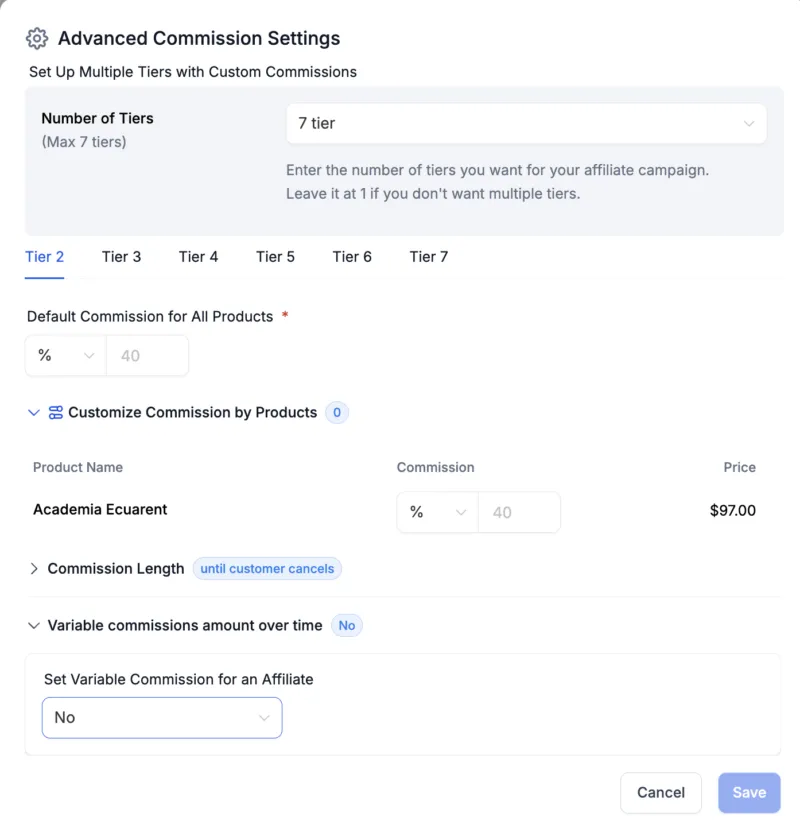
Once multi-tier is enabled, you’ll define the commission percentage or amount for each tier. For example, Tier 1 (direct affiliates) might get 30%, Tier 2 (affiliates referred by your affiliates) might get 10%, Tier 3 might get 5%, etc. Virelynx lets you either apply the default commission to all tiers or customize each tier’s rate.
Customizing can be useful to gradually reduce the percentage in deeper tiers.
Keep in mind, multi-tier commissions can significantly motivate your affiliates to recruit others (turning your best affiliates into mini-managers).
For instance, Affiliate A refers Affiliate B under them; when B makes a sale, B gets the normal commission and A could get an override commission (like a finder’s fee) for bringing B into the program.
This structure can exponentially grow your reach, but be sure to set commission percentages that are sustainable for your margins.
(If you don’t need a multi-tier program, you can skip this step. Many standard affiliate programs are one-tier where only the direct referrer earns a commission.)
Step 6: Add Affiliates to the Campaign (or Invite Later)
Towards the bottom of the campaign setup, you have the option to assign affiliates directly to the campaign before saving.
You can add existing affiliates here (from your Affiliate Manager’s affiliate list) to immediately include them in this campaign. If you already have some people who have agreed to be your affiliates, you might want to add them now so they get their links right away.
However, you can also create the campaign first and add affiliates later via the Affiliates section – it’s up to you. Note that a campaign cannot go fully “live” (i.e., start tracking real referrals) until at least one affiliate is assigned to it.
If you choose to add affiliates now in the campaign setup, just select them from the list (Virelynx will show your affiliate contacts to pick). When you add affiliates here and save the campaign, those affiliates will automatically receive an invite email with their affiliate portal login (if you have the invite email setting enabled) and their unique link for the campaign.
If you prefer to invite affiliates separately or you don’t have any affiliates yet, you can leave this blank for now. We will cover how to add affiliates to your program in the next section.
Also, take this opportunity to double-check additional settings for the campaign:
Cookie Duration: Set how long the affiliate tracking cookie should last. For example, a 30-day cookie means if a referred visitor purchases within 30 days of clicking the affiliate’s link, the affiliate gets credit. You might adjust this based on your sales cycle (common durations are 30, 60, 90 days, or even “lifetime” for one-time payouts).
Payout Frequency: Determine how often you will pay affiliates (this is more of an informational setting to communicate in the system). Common options are Pay Immediately, Weekly, Net-15, Net-30, Monthly etc.
Virelynx provides options like Pay-7, Pay-30, etc., which typically mean the payout occurs that many days after a sale. Choose what fits your business – e.g., Pay-30 (pay commissions monthly) is a standard choice.
Affiliate Notifications: Ensure the “Invite Email” toggle is on if you want Virelynx to send automatic invitation emails to new affiliates when they’re added to a campaign. You can customize the email template in the settings if needed (for a personal touch or specific instructions to affiliates).
Include Setup Fees: If your product has a setup fee or one-time charge and you want to pay commission on that as well, you can enable commission on setup fee. If not, you can exclude it so affiliates only earn on the recurring or main product price.
Allow Sub-Affiliate Signups: If you enabled multi-tier, you’ll see an option to allow affiliates to recruit sub-affiliates via a sign-up page. Turning this on will generate a special sign-up link that your affiliates can share to invite others under them.
You will need to select a form that potential sub-affiliates fill out. (For example, you could create a simple affiliate application form in Virelynx, and select it here as the sub-affiliate signup form.)
Auto-Enroll New Customers: Another powerful option – you can automatically turn new customers into affiliates (and assign them under the referring affiliate) after a purchase. This is great for SaaS or membership referrals.Enabling Auto Enroll New Customers as Sub-Affiliates means whenever an affiliate’s referral makes a purchase, that new customer is added to your Affiliate Manager as a sub-affiliate under the referring affiliate.
Essentially, your affiliate network can grow on autopilot with each sale.
Step 7: Publish Your Affiliate Campaign
After filling in all the details and settings above, it’s time to make your campaign live. Virelynx gives you the option to “Save as Draft” or “Publish” the campaign.
If you’re ready, click Publish. If you want to double-check later or wait until you have affiliates lined up, save it as a draft first.
Once published, your affiliate campaign is active. Congratulations – you’ve created an affiliate program in Virelynx!
At this point, any affiliates added to the campaign will have their unique referral link (which you can find in their Affiliate Profile page or they can find in their portal), and the system will start tracking clicks, sign-ups, and sales for those links. You can always edit the campaign later to adjust commissions or add/remove products and affiliates as needed.
Tip: After publishing, test the setup with a dummy affiliate if possible. For example, use an affiliate link in a private browser to simulate a referral, fill out a form or purchase a test product, and see if the conversion shows up in the Affiliate Manager. This will ensure everything is tracking correctly before you roll out to real affiliates.
Everything set up? If you haven’t yet, this is a great time to experience it yourself – sign up for a 14-day free trial of Virelynx and try creating a campaign following the steps above. You’ll see how quick it is to configure an affiliate program with no coding or third-party tools required!
Using the Virelynx Affiliate Portal
One of the best features of Virelynx’s affiliate system is the built-in Affiliate Portal for your affiliates. This is a separate login where each affiliate can track their own performance, get their links, and access resources, without needing access to your main Virelynx account. It makes your program feel professional and self-service.
Here’s what happens and what affiliates can do:
Affiliate Invitation: When you add an affiliate to a campaign and have the invite email enabled, the affiliate gets an email with a link to set up their password for the Affiliate Portal.
This email can be customized (under Marketing > Affiliate Manager settings > Email Templates) to include your branding and any instructions. Once they set a password, they can log in anytime at your special affiliate portal URL.
Logging In: Affiliates log in through a special link (often a subdomain of your account or a generic Virelynx affiliate login). Once inside, they land on their Affiliate Dashboard.
Dashboard Overview: Affiliates see a summary of their metrics: how many clicks their links have generated, how many leads and customers they’ve referred, how much commission they’ve earned, etc.
All campaigns that they are part of will be listed. They can also quickly find their unique referral links for each campaign on the dashboard. This is super handy – no need for them to ask you; they can copy their link directly.
Leads/Customers Screen: The portal provides a section where affiliates can see details of the leads or customers they have referred. For example, if an affiliate referred 5 people who signed up on your site, they might see those 5 names or IDs, and their status (lead, purchased, etc.). This transparency helps affiliates gauge the quality of their traffic and follow up if needed (some affiliates like to know who signed up via their link to tailor their approach).
Commission/Payout Screen: Affiliates can view the commissions they’ve earned, broken down by status – pending, approved, paid, etc. They can see total earnings and perhaps upcoming payout dates if you’ve communicated those.
This keeps your affiliates motivated, as they can literally watch their earnings grow in real time. It also reduces confusion since they don’t have to guess if a sale was tracked or not – it’s all visible.
Sub-Affiliates Page: If you have multi-tier enabled, affiliates will see a section listing any sub-affiliates under them.They can see who those sub-affiliates are and possibly the sub-affiliates’ performance.Additionally, if you allowed affiliate-driven recruitment, this page will show the affiliate their unique sign-up link to recruit new sub-affiliates.
They can copy that link and share it to grow their downline.
Media/Resources: Virelynx’s affiliate portal also can display any media or marketing resources you’ve shared (via the Media Library in the Affiliate Manager). So if you uploaded banners, logos, or PDF guides for affiliates, they can download those assets from the portal to aid in their promotions. This is a big plus, as it centralizes all affiliate needs in one place.
In essence, the affiliate portal is the affiliate’s command center. It empowers your affiliates with information and tools: they no longer need to email you asking “Hey, what’s my link?” or “Did I get credit for XYZ sale?” – they can just log in and see it. This convenience makes your program more attractive to affiliates (especially experienced ones who expect a good tracking system). As the admin, you can also impersonate or view an affiliate’s portal if needed for support, but typically it runs itself.
Make sure to communicate with your affiliates about how to use the portal. When you onboard a new affiliate, you might send them a friendly note: “Welcome to our affiliate program! You’ll receive an email to activate your Affiliate Portal account. There you can grab your links and track your progress. Let us know if you need anything!” – such guidance helps them get started quickly.
Lastly, Virelynx recently introduced real-time click tracking visible in the portal and your dashboard. Affiliates can see clicks updating live, which can be exciting. This level of transparency and up-to-the-minute data can encourage your affiliates to ramp up their efforts, knowing they can immediately see the impact of a promotion they run.
Tracking Performance and Paying Your Affiliates
Now that your affiliate program is up and running, ongoing management will involve tracking the results and handling payouts. Virelynx provides robust reporting and payout management features to streamline this.
Monitoring Affiliate Performance
Within the Affiliate Manager Dashboard (for you as the admin), you have a view of how your affiliate campaigns are performing. Some key metrics and tools include:
Core Metrics: You can quickly see total revenue generated by affiliates, number of customers referred, conversion rates, etc., for your campaigns. This gives you an idea of the affiliate channel’s contribution to your business.
Conversion Trend: A graph of leads and customers over time from affiliates helps spot trends – for instance, did a certain promotion by affiliates lead to a spike in referrals? Use this to identify what’s working.
Affiliate Leaderboard: Virelynx offers a leaderboard of your top-performing affiliates (top 10 by revenue, commissions, leads, etc.) . This is great for identifying star affiliates. You might even run contests or bonuses using this data – e.g., reward the top affiliate of the month.
Pending Actions: A quick view of any pending payouts or pending commission approvals. For example, if you manually approve commissions or have thresholds, this reminds you to take care of them.
Latest Updates: Recent affiliate sign-ups or recent big sales are highlighted, so you never miss important changes (like a new affiliate who just joined or a large commission that was just earned).
On a per-campaign and per-affiliate level, you can drill down. Each campaign can show you its specific stats, and each affiliate’s profile shows their individual stats. The platform even tracks clicks now in multiple places (dashboard, affiliate list, etc.) for real-time insight.
This comprehensive tracking means you can measure the success of your affiliate program with ease and share highlights with your affiliates (“We reached 100 affiliate sales this quarter!”).
Handling Commissions and Payouts
Paying your affiliates promptly and accurately is crucial to maintaining a healthy affiliate program. Here’s how to manage payouts in Virelynx:
Commission Tracking: As sales or leads come in through affiliates, Virelynx will log commissions in the system automatically. Each commission might be marked as pending initially, and then you can mark it approved or paid once you pay it out.
The Payouts tab in the Affiliate Manager is where you handle these statuses. It typically has sub-tabs for Pending, Approved for Payout, Paid, Denied, etc., to help you filter. For example, when an affiliate makes a sale, you might have a 30-day refund waiting period. You could leave the commission in “Pending” until that period passes, then move it to “Approved” status.
Payment Methods: Virelynx currently supports paying affiliates manually (outside the system) or using integrated gateways like PayPal for automatic payouts.
A popular approach is using PayPal Mass Pay or similar. The Affiliate Manager has a setting to connect PayPal so that you can trigger payouts directly from within Virelynx, saving time. Once connected, you could, say, click a button to pay all “Approved for Payout” commissions via PayPal in bulk. This is a huge time-saver if you have many affiliates. (Make sure affiliates have a PayPal email on file in their profile if you use this).
Payout Frequency: As set in the campaign, you should pay affiliates on the promised schedule (e.g., monthly). You can use the system’s filters to see which commissions need paying in a given period. Many admins export a CSV of due commissions (Virelynx provides a download option) for record-keeping or to process payments if doing it manually. If using PayPal Auto Payouts, the system can handle it once you initiate.
Recurring Commissions: If you offer recurring subscription products, Virelynx tracks those as well. For instance, if an affiliate referred a customer who pays a monthly subscription, each renewal can generate a commission for the affiliate automatically. (assuming you set the product’s commission terms accordingly). The platform will log those recurring commissions without you having to re-enter anything. It even tracks upgrades or downgrades – ensuring affiliates get the appropriate commission on each transaction.
Manual Adjustments: In cases where a sale wasn’t tracked (rare if everything is set up, but say you needed to credit an affiliate for a sale manually), you have the option to add a manual commission in the system. There’s an action “Add Manual Sale” in the Affiliate Manager where you can attribute a sale to an affiliate. This will generate a commission entry so that it’s counted and can be paid out like others.
When you’re ready to actually pay the affiliates, simply go through the Pending or Approved list, mark them as Paid as you distribute the money (whether by PayPal, bank transfer, etc.). Virelynx doesn’t handle the money movement (except via PayPal integration), but it keeps the ledger for you. After paying, affiliates will see their commission status update to Paid in their portal, which gives them confidence in your program’s reliability.
Tip: Consistency is key. If you promise payouts by the 15th of each month, do so. Your Affiliate Manager dashboard can be checked at a glance to see total payout amounts due. Keeping your affiliates happy with on-time payments will encourage them to promote you more.
Tips for a Successful Virelynx Affiliate Program
Setting up the mechanics is just the beginning. To truly grow a thriving affiliate program in Virelynx, consider these best practices:
Recruit Proactively: Don’t wait for affiliates to come to you. Reach out to happy customers, industry partners, or influencers and invite them to join your program. Have a sign-up page ready (you can build one with a Virelynx funnel and integrate it to the Affiliate Manager as described) and make the process seamless.
Provide Promotional Materials: Use the Media Library to share ready-to-use banners, email copy, social media images, etc., with your affiliates. Affiliates appreciate not having to create marketing materials from scratch. The easier you make it for them to promote (with attractive graphics and copy), the more likely they will drive traffic that converts.
Communicate & Support: Keep in touch with your affiliates. You can send regular update emails (e.g., “This month’s top affiliate earned $X – here’s a tip they used…” or “New promo coming up, here are your links”). If an affiliate has questions, answer quickly. Virelynx’s automation can help send welcome emails or even SMS to new affiliates with instructions, but personal touch matters too.
Use the Data: Leverage the Affiliate Leaderboard and stats to run contests or incentives. For example, “Whoever brings in the most sales in June gets a $200 bonus!” Since you can see live stats, you and affiliates can monitor the competition. Small competitions or time-limited bonus commissions can spike motivation.
Optimize Your Funnel for Conversions: All the affiliate traffic in the world won’t help if the page they send people to doesn’t convert. Use Virelynx’s funnel builder and A/B testing to ensure the referral traffic has a high chance of converting to a lead or sale. Affiliates will be more excited to promote an offer that they know converts well (meaning more commission for them). Share conversion rate info with them if it’s good.
Ensure Tracking is Robust: Periodically, do test purchases or have affiliates test their links to double-check tracking. Virelynx’s affiliate tracking is reliable, but if you change page URLs or domains, update your campaigns accordingly. The new click tracking feature helps verify that clicks are registering. Keeping tracking airtight builds trust with affiliates – they know they’ll be credited properly for every referral.
Scale with Automation: As your program grows, rely on Virelynx’s workflows and triggers to save time. For instance, set up an automation to email you when a new top-tier affiliate signs up, or automatically send a “Congrats on your first sale” message to an affiliate when they earn their first commission (you can do that with Virelynx triggers and the affiliate events). These little touches, powered by automation, can significantly improve the affiliate experience.
By following these tips and utilizing Virelynx’s rich feature set, you’ll create a win-win environment: affiliates earn income by selling your product, and you gain sales and customers that you might not have reached otherwise. The key is to treat your affiliates like partners – give them the tools, support, and rewards they deserve, and your program will flourish.
Your Blueprint for Affiliate Marketing Success
Virelynx provides an incredibly robust affiliate management system that’s seamlessly integrated into its all-in-one platform. You’ve learned how to create an affiliate program in Virelynx step by step – from setting up your first campaign and defining commissions, to onboarding affiliates and tracking their performance.
With features like multi-tier commissions, an affiliate portal for real-time stats, and automation capabilities, Virelynx’s Affiliate Manager can power programs of all sizes, whether you’re running a small referral program or a large-scale affiliate network.
By leveraging this tool, you keep everything under one roof: your marketing funnels, CRM, and affiliate marketing all speak to each other. This means less hassle with integrations and more focus on building relationships with your affiliates and driving sales.
Now the ball is in your court. It’s time to put this into action and watch your reach and revenue grow through affiliate marketing.
How will you start? Perhaps begin by identifying a product or service you know your audience loves, set up a campaign for it in Virelynx, and invite a handful of enthusiastic partners to join as affiliates. Provide them great support and materials, and scale up from there.
Remember, a successful affiliate program can become a major revenue stream for your business – and you now have the blueprint and tools to create one with ease.
Ready to launch your affiliate program?
Don’t wait to capitalize on the power of referral marketing. Start your free 14-day trial of Virelynx today and implement your affiliate program step-by-step. With Virelynx’s Affiliate Manager, you’ll be able to grow your business faster while building a community of partners who succeed alongside you. Happy affiliating!

Virelynx is the apex automation engine, purpose-built for growth-driven entrepreneurs, marketers, and agencies who demand efficiency without compromise. By fusing CRM precision with agile automation, it streamlines every moving part of your business, from lead capture to client retention.
© 2025 Virelynx All Rights Reserved.